

Remini Pregnancy AI: Try the Viral Maternity Trend (2026)

Remini Pregnancy AI is a viral filter inside Remini’s AI Photos feature that generates maternity portraits of you — a styled, believable “you, expecting” photoshoot built from your selfies. It is genuinely fun, and the results can be startlingly realistic. It is also, to be completely clear before anything else, generated entertainment imagery: not a photograph of a real pregnancy, not a glimpse of your future, and not anything medical. This guide covers how it works, what it costs, and how to think about it — whichever of the three situations below brought you here.
Last updated: October 29, 2026
Table of Contents
First, the Honest Part: What These Photos Are and Are Not
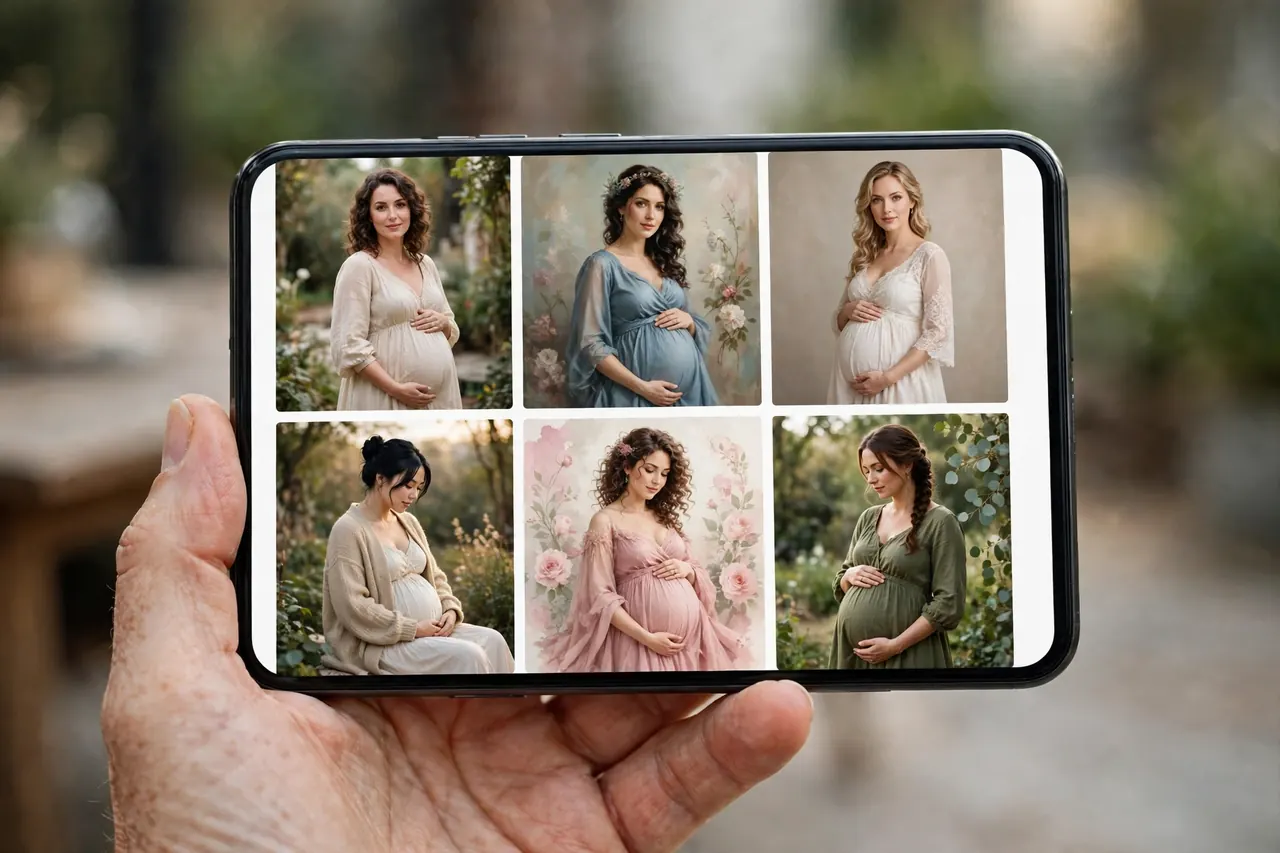
The trend took off on TikTok because the images look like a professional maternity shoot — soft light, styled dresses, a convincing bump. Underneath, the process is the same one behind Remini’s other AI portraits (the technology family covered in our Remini AI avatars guide): you upload a set of selfies, the app trains a temporary model of your face, and it renders that face into maternity scenes. Nothing about your body, health or future is measured or predicted. The bump is set dressing. The glow is lighting. Anyone who shares these photos as if they were real — or treats them as a sign of anything — is using a photo filter as something it is not. Used with that understanding, it is a harmless and often delightful bit of play. The scenarios below take it from there.
Scenario One: You Are Not Pregnant — You Just Want the Photos
You are the majority of this trend: curious, maybe planning a someday, maybe just here because the results flooding your feed look gorgeous. For you the flow is simple and the stakes are low. Open Remini, go to AI Photos, upload around eight clear selfies, let the model train, then find the pregnant filter under Top Picks, apply it to your model image, and save the portraits you like. Expect a gallery of styles — studio, outdoor, classic, glamorous — rather than one fixed look, and expect to generate more than you keep: two or three favorites out of a batch is a normal hit rate.
Two practical notes. First, this sits behind Remini’s premium tier in most regions — the free version lets you look, but generating AI Photos is a paid feature, so read the cost section below before the trend reads your wallet. Second, think for two seconds before posting: a realistic maternity photo on a public profile will be read as an announcement by at least one aunt. A caption costs nothing.
Scenario Two: You Are Actually Expecting
For genuinely pregnant users, the appeal is different: announcement photos, keepsakes, and maternity looks — the flowing dress, the golden-hour field — without booking a shoot in the third trimester. The generated portraits can be lovely for that, with one honest caveat: the AI is rendering an imagined version of your pregnancy, built from pre-pregnancy selfies. The bump size, the styling, even the mood are the app’s invention, and at some angles the face drifts a few percent away from you. Many couples find that charming for a playful announcement (“the AI thinks we’ll look like this”) and wrong for the announcement — the one that should be unmistakably, really you. If you use the images publicly, a light disclosure keeps you honest with the people who love you. And if you are collecting the whole set of life-stage portraits, the companion trend is our Remini Wedding AI guide, which works the same way.

Scenario Three: You Are Trying to Conceive — Read This One Carefully
This section exists because the others do not say it: if you are trying to conceive, especially if it has been a long road, a feed full of AI maternity portraits — including your own face on an expecting body — can land very differently than the trend intends. The images are not a prediction, a promise, or a preview of anything. They are a filter. Some people in this situation find generating them hopeful and fun; others find them quietly painful, and both reactions are normal. There is no version of this feature you need to try to keep up with anyone. If you do use it, use it on a good day, keep the privacy notes below in mind, and close the app the moment it stops being play. No photo trend is worth a hard evening.
How It Works, Step by Step
Whichever scenario is yours, the mechanics are identical:
- Open Remini → AI Photos. The pregnancy filter lives inside the AI Photos feature, not the photo enhancer.
- Upload about 8 selfies. Clear, front-facing, varied expressions and light. This set trains your model — its quality decides everything downstream.
- Wait for training. Generation is not instant; the model build plus rendering takes minutes, not seconds.
- Pick your model photo and the pregnant filter. Find it under Top Picks, select the style you want, and generate.
- Save the keepers. Download the portraits you like to your phone immediately — generated sets are not a permanent archive.

Why Some Results Look Real and Others Do Not
The difference is almost never the filter — it is the training set. The pattern from thousands of posted results:
| Factor | Looks realistic | Looks “off” |
|---|---|---|
| Selfies | Sharp, front-facing, eyes open, varied angles | Blurry, sunglasses, heavy filters, group crops |
| Lighting in selfies | Even daylight | Harsh shadows, nightclub flash |
| Face drift | Minimal with a strong selfie set | Features subtly rearranged on weak sets |
| The bump and body | Styled scenes hide the joins | Tight crops expose odd hands and edges |
One more expectation to set: Remini enhances and generates faces brilliantly, but hands, jewelry and fabric edges are where AI portraits still confess. Check the details before you share — our Remini AI headshots guide covers the same quality checks for professional portraits.
What It Actually Costs
Remini Pregnancy AI is part of the premium AI Photos offering. The free tier of Remini covers basic enhancement; training an AI model and generating portrait packs is a paid feature, typically reached through a subscription or the app’s premium credits, and pricing varies by region and platform — check the in-app screen before you start, not after the model has trained and the paywall appears. If you are offered a trial, our Remini free trial guide explains how to use the trial window without it quietly converting into a weekly bill. The one-line version: the trend is free to watch and costs money to join.
Privacy: Your Face Trains the Model
AI Photos works by uploading your selfies to Remini’s servers for processing — that is how cloud generation works, and this feature asks for more of your face than most. Before you upload a training set, read our Remini safety review for what Remini (Bending Spoons) says it retains and how deletion requests work. Practical minimums: use selfies you are comfortable having processed on a server, skip anything sensitive, and remember the generated portraits themselves reveal nothing medical about you — but they do look like announcements, so share them deliberately.

Pregnancy AI vs Baby AI: Two Different What-Ifs
Readers mix these up constantly, and Remini does not help by housing both in AI Photos:
| Pregnancy AI | Baby AI | |
|---|---|---|
| What it generates | Maternity portraits of you | A predicted child’s face from two parents’ photos |
| Starting material | Your selfies | Photos of both parents |
| The fantasy | “Me, expecting” | “Our future baby” |
| Full guide | This article | Remini Baby AI |
Both are entertainment. Neither predicts anything about a real future child or pregnancy.
Frequently Asked Questions
What is Remini Pregnancy AI?
A filter inside Remini’s AI Photos feature that generates maternity portraits from your selfies. You upload around eight photos, the app trains a model of your face, and the pregnant filter under Top Picks renders you in styled maternity scenes. It is generated entertainment imagery — not a real photo and not a prediction.
How do I get the viral TikTok pregnancy filter?
Open Remini, go to AI Photos, upload your selfie set and let the model train, then choose your model photo and apply the pregnant filter from Top Picks. Save the results you like. The feature sits in the same AI Photos section as Remini’s avatar and headshot generators.
Is Remini Pregnancy AI free?
Generally no. AI Photos generation is a premium feature in most regions, reached through a subscription or premium credits, though the app may offer trial access. Check the in-app price screen for your region before training a model, and watch trial terms so a free look does not become a weekly charge.
How many selfies do I need?
Around eight is the standard set the flow asks for. Quality matters more than count: sharp, front-facing photos in even light, with varied expressions and no sunglasses or heavy beauty filters, produce the most realistic portraits.
How long does it take to generate the photos?
Minutes, not seconds. The app first trains a model on your selfies, then renders the portrait set. Times vary with server load; closing and reopening the app does not speed it up, and your results wait for you in AI Photos when they are ready.
Does Remini Pregnancy AI work on iPhone?
Yes. The feature is part of Remini’s AI Photos on both iPhone and Android, and the flow is the same. Pricing and whether a trial is offered can differ between the App Store and Google Play, so check the screen in your own store.
Will the AI maternity photos actually look like me?
Mostly, with a good selfie set — the face is recognizably yours, which is the point of training a model. Expect some drift: heavy enhancement, weak source photos, and tight crops can shift features slightly or produce odd details in hands and jewelry. Treat the best results as a styled likeness, not a portrait sitting.
Is it okay to use Pregnancy AI if I am trying to conceive?
That is a personal call, and this guide will not dress it up: the images are a filter, not a prediction or a promise, and for some people on a long conception journey they sting rather than delight. If you try it, do it because it feels like play — and skip it entirely if it does not. No trend is obligatory.
Conclusion
Remini Pregnancy AI earned its virality honestly: the portraits are beautiful, the process takes minutes, and seeing yourself in a life-stage photoshoot is a genuinely new kind of fun. It stays fun as long as everyone remembers what it is — generated imagery from a photo app, not a photograph, not a forecast, and not a medical anything. Pick your scenario, feed it good selfies, check the price before the paywall, and share the results with the caption they deserve.
Related Remini Guides
- Remini Baby AI
- Remini Wedding AI
- Remini AI Avatars
- Remini AI Headshots
- Remini AI Yearbook
- Remini AI Filters List
- How to Use the Remini App
- Remini Free Trial
- Is Remini Safe?
- Best Remini Settings
Written by Rahul Sharma
