
Remini AI Yearbook: Create Viral Yearbook Photos from Selfies (2026)

Remini AI Yearbook turns 8 to 12 of your selfies into realistic 90s-style yearbook portraits, complete with vintage hairstyles, retro outfits, and classic school-photo backdrops. If you have seen those throwback yearbook photos flooding TikTok and Instagram, this is the feature behind many of them — and you can make your own in about ten minutes of setup, plus the AI generation time. The idea is simple, but the results depend heavily on the photos you upload. In this guide, you will learn exactly how Remini AI Yearbook works, how to create your first set step by step, which selfie mistakes ruin results, what it costs, and where its limits lie — so you do not waste a free trial or a subscription on a disappointing first batch.
Table of Contents
What Is Remini AI Yearbook?
Remini AI Yearbook is a generative AI photo feature inside the Remini app. Instead of enhancing an existing photo — which is what Remini is best known for — it creates entirely new portraits of you in a style you choose. You upload a set of selfies, the AI learns your facial features, and it then renders you in yearbook-style scenes: think 90s school portraits, varsity jackets, denim shirts, soft studio lighting, and the slightly grainy, w/arm look of film photography. It sits in the same AI Photos family as Remini’s other generative models. Where one model turns you into a baby, another gives you professional headshots, and another builds stylized avatars, the yearbook model is specifically about nostalgia: the look of a high school yearbook photo from the 1980s or 1990s, even though you never sat for one. Two things make it different from a simple filter. First, it does not just overlay a retro effect on one selfie; it generates new images, with new poses, outfits, and backgrounds. Second, because it trains on several photos of you, the results usually look more like you than a one-photo filter would — provided your uploads are good. That last condition matters more than anything else in this guide.
How Remini AI Yearbook Works
The process has four stages, and understanding them explains almost every common complaint about the feature. First, you upload 8 to 12 selfies. Remini asks for variety on purpose: different angles, expressions, lighting conditions, and backgrounds. A dozen near-identical front-facing selfies teach the AI very little, while varied photos help it understand your face in three dimensions. Second, you pick your gender and a yearbook style or model image. The model image is the template: the pose, outfit, and backdrop your face will be placed into. Different model images give very different results, so this choice is worth a minute of thought rather than a rushed tap. Third, the AI generates a set of portraits. This is not instant. Generation typically takes several minutes, and you can leave the app and come back — Remini notifies you or shows the finished set in the AI Photos section when it is ready. Expect a batch of images rather than a single perfect shot; part of the fun, and part of the workflow, is picking the best few. Fourth, you save, share, or enhance your favourites. The generated portraits can be downloaded to your phone, posted to social media, or run through Remini’s Enhance tool for extra sharpness. Many users find that a light enhancement pass makes the best yearbook portraits look even more like real scanned film photos.
How to Create Your Remini AI Yearbook Photos (Step by Step)
Follow these steps in order, and do not rush the photo-selection step — it decides 80 percent of your result quality.
- Open the Remini app and make sure it is updated to the latest version. AI Photos features, including yearbook styles, roll out by app version and region, so an outdated app is the most common reason the option seems missing. If you are new to the app, our guide on how to use Remini walks through the basic layout first.
- Tap AI Photos on the home screen. This is the section that holds Remini’s generative models, separate from the Enhance tab used for improving existing photos.
- Choose a yearbook-style model. Browse the available model images and pick one whose pose, outfit, and era you actually like. If several yearbook styles are offered, start with the most classic one — a standard studio portrait — before trying novelty outfits. You can always generate another batch later.
- Upload 8 to 12 selfies when prompted. Use the tips in the next section. Remini will reject photos that are too blurry, too dark, or that show more than one person clearly, so choose clean, solo shots.
- Confirm your gender selection and start generation. Double-check this step: it affects hairstyles and outfits in the output, and a wrong selection is a common cause of odd-looking first batches.
- Wait for generation to finish, then review the full set. Do not judge the feature by the first image alone. Scroll through everything, save your favourites, and delete the misses. AI generation is a numbers game, and even a good batch contains a few awkward frames.
- Optionally enhance your favourites. Running a chosen portrait through Remini Enhance can sharpen facial details and smooth the vintage grain into a cleaner finish. Try it on one photo first and compare before applying it to the whole set.
Best Selfies for Remini AI Yearbook: 8 Tips That Actually Matter
This is the section most guides rush past, and it is the one that matters most. The AI can only work with what you give it.
- Use recent photos. Your face changes over time, and old photos mixed with new ones confuse the model. Photos from the last year or two work best.
- Vary your angles. Include front-facing shots, slight left and right turns, and at least one three-quarter view. Avoid submitting twelve copies of the same angle.
- Vary your expressions. A mix of neutral, slight smiles, and natural smiles helps the AI separate your bone structure from one frozen expression.
- Use good, natural light. Daylight near a window beats harsh overhead lighting or a dark room. Avoid heavy shadows across half your face.
- Keep your face fully visible. No sunglasses, no heavy hats, no hands covering your chin, and no extreme filters. The AI needs your real features.
- Avoid group photos. Crop tightly to yourself if needed, but never submit a photo where another person’s face is prominent — the model may blend features.
- Skip heavy makeup or beauty filters in uploads. What looks flattering on Instagram hides the skin texture and facial detail the AI uses to recognise you.
- Include different backgrounds. Bedroom, outdoors, office — variety in background helps the model focus on your face rather than memorising one scene.
If your first batch looks nothing like you, the cause is almost always here: too few photos, too little variety, or heavy filters on the uploads. Generate a second batch with better selfies before blaming the feature.

Remini AI Yearbook Styles to Try
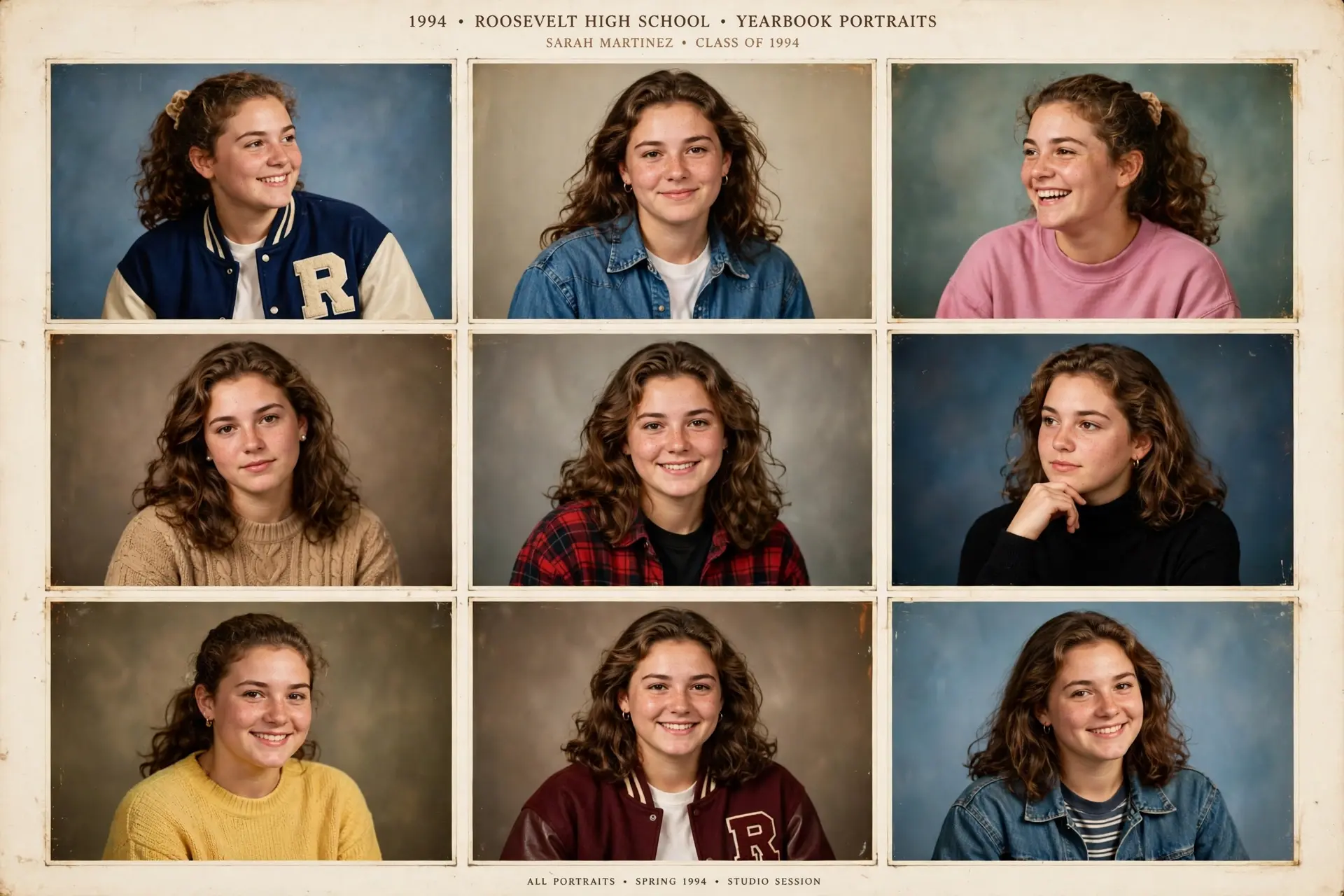
The classic 90s studio portrait is the signature look: soft lighting, a plain or gradient backdrop, a denim or collared shirt, and a relaxed, slightly formal pose. It is also the most forgiving style, because the framing is simple and the AI has fewer props to get wrong. Varsity and sporty looks are the second most popular category. Letterman-style jackets, team-style poses, and gym backdrops photograph well in the yearbook format, and they suit users who want a fun, shareable result rather than a realistic one. Casual denim and everyday 90s looks sit in between: jeans jackets, simple tops, and natural poses that look like a real school photo day rather than a costume shoot. These tend to age best on a social feed, because they read as nostalgic rather than gimmicky. A practical tip: generate your first batch in one style only. Mixing styles in a single batch makes it harder to tell whether a bad result came from the style or from your selfies. Once you know your uploads work, experiment freely — a second batch in a different style costs little extra time.
Is Remini AI Yearbook Free? Pricing Explained
Remini AI Yearbook is a premium AI Photos feature, which means the full experience sits behind a subscription in most regions. New users can often start with a Remini free trial, which is the smartest way to test the yearbook feature: you can generate a batch, judge the quality honestly, and cancel before billing if it is not for you. Our Remini free trial guide explains exactly how the trial window and cancellation timing work. If you stay subscribed, check the current Remini subscription plans before paying, because weekly and yearly pricing differ sharply and the yearly plan is far cheaper per month for anyone who will use AI Photos more than once. Prices vary by country and platform (App Store versus Google Play), so treat any single price you see quoted online as a snapshot, not a promise. One honest warning: do not pay for a subscription just to make one yearbook photo for a single post unless that post matters to you. A trial covers a first batch for most users, and the free version of Remini — which covers basic enhancement — does not include the full AI Photos generation set. Pay for the feature, not for the hype.
Remini AI Yearbook vs Other Remini AI Trends
The yearbook model is one member of a larger AI Photos family, and choosing the right one saves you a wasted batch.
| Model | Look | Best for |
|---|---|---|
| Remini AI Yearbook | 90s school portraits | Nostalgic, viral throwback posts |
| Remini AI Avatars | Stylised artistic portraits | Profile pictures, creative looks |
| Professional headshots | Clean corporate portraits | LinkedIn, CVs, business profiles |
| Remini Baby AI | Baby-face predictions | Fun couple and family posts |
| Wedding AI | Wedding photoshoot portraits | Anniversary and couple content |
If you want a realistic professional photo, headshots are the better model — yearbook portraits are deliberately retro and will not pass as a modern corporate headshot. If you want stylised art, avatars beat yearbook. And if you are choosing between enhancement and generation in general, remember that yearbook photos are generated from scratch, while the classic Remini Enhance tool improves a photo you already have. For the best overall results from either path, the best Remini settings guide is worth a read before you start.
Honest Limits: What Remini AI Yearbook Gets Wrong
No honest guide should pretend AI yearbook photos are perfect. Here are the real limits, stated plainly. Faces can drift. Even with great selfies, some generated portraits will look like a cousin of yours rather than you. That is normal for generative AI, and it is why you get a batch: you keep the ones that land and discard the rest. Hands, text, and small details can glitch. Yearbook portraits mostly avoid this by keeping framing tight on the face and torso, but props, lettering on jackets, and background objects sometimes render oddly. Check details before posting a portrait as if it were a real photograph. It is not a real photograph, and you should not present it as one. A yearbook portrait of a school you never attended is a fun piece of AI art, not a historical document. For social posts this rarely matters, but do not use generated portraits for identity documents, official applications, or any context where a real photo is required. Privacy deserves a thought too. You are uploading biometric-style data — your face — to a cloud service to train a temporary model. Remini states that AI Photos data is handled under its privacy policy, and you can delete generated sets from the app. If that trade-off bothers you, read our is Remini safe review before uploading, and delete sets you no longer need. Never upload photos of children or of other adults without their clear permission.
Troubleshooting: Common Remini AI Yearbook Problems
Generation stuck or taking very long: first check your internet connection and storage, then close and reopen the app. Generation is server-side, so a weak connection can stall the progress display even while the job continues. If a batch fails outright, try again with a fresh set of selfies — a rejected upload is a common silent cause. Results do not look like you: rebuild your selfie set using the tips above, with more angles and no filters. Also check that the gender selection matches the model you chose. If a second batch still misses, try a simpler, classic studio style before a complex outfit style. Yearbook option missing from the app: update Remini, then check the AI Photos tab rather than the Enhance tab. Availability varies by version and region, and some styles rotate in and out. If the option is genuinely absent in your region, a VPN or sideloaded version is not recommended — it risks your account and your photos. Watermarks or low resolution on saved images: free-tier exports can carry limitations, and saving a preview instead of the full result can look soft. Save from the finished AI Photos set, not from a screenshot, and enhance the saved file if you need extra sharpness. For official help, see Remini Support.
Frequently Asked Questions
How many selfies does Remini AI Yearbook need?
Remini AI Yearbook needs 8 to 12 selfies. Fewer photos give the AI less to learn from, while more than 12 rarely improves results and can slow the upload step. Variety matters more than quantity: different angles, expressions, and lighting beat twelve similar shots.
How long does Remini AI Yearbook take to generate?
Generation typically takes several minutes after upload, though busy periods can stretch it longer. You do not need to keep the app open the whole time; check back in the AI Photos section for the finished set.
Is Remini AI Yearbook free?
The full yearbook generation feature is premium in most regions, but new users can often try it during a free trial. Basic photo enhancement in Remini is free, but AI Photos generation — including yearbook styles — generally requires a subscription or trial.
Why do my Remini AI Yearbook photos not look like me?
The usual cause is the selfie set: too little variety, heavy filters, sunglasses, or group photos. Rebuild the set with recent, well-lit, solo selfies from several angles, choose a classic studio style, and generate a second batch before judging the feature.
Can I use Remini AI Yearbook photos on Instagram and TikTok?
Yes — that is exactly what the feature is designed for. Save the finished portraits from the AI Photos set rather than screenshotting previews, and pick the most realistic frames for a feed post. Avoid presenting a generated portrait as a real historical school photo.
Does Remini AI Yearbook work for couples or groups?
No. Remini AI Yearbook trains on one person’s face per batch, so couple or group yearbook photos are not a supported use. Each person should generate their own set, and you can post the results side by side.
Is Remini AI Yearbook safe for my photos?
Remini processes your uploads on its servers to generate the portraits, and you can delete generated sets in the app. Only upload your own photos or photos you have clear permission to use, avoid uploading children’s photos, and review Remini’s current privacy policy if you want the full data-handling details.
What is the difference between Remini AI Yearbook and Remini AI Avatars?
Remini AI Yearbook creates realistic 90s school portraits, while Remini AI Avatars creates stylised, artistic portraits in varied art styles. Choose yearbook for nostalgia and realism, and avatars for creative, stylised profile pictures.
Conclusion
Remini AI Yearbook is at its best when you treat it as what it is: a fun, well-executed generative feature that rewards good selfies and honest expectations. Upload 8 to 12 varied, recent, well-lit photos, start with a classic 90s studio style, try it on a free trial before paying, and judge the whole batch rather than one frame. Do that, and you will likely get several portraits worth posting — and a much better sense of whether Remini’s other AI Photos models are worth your time next.
By Rahul Sharma — ReminiDownload.online’s resident photo-enhancement writer, covering Remini’s AI features, pricing, and practical how-to guides.
